Managing disk space with LVM

July 21, 2007 0 comments
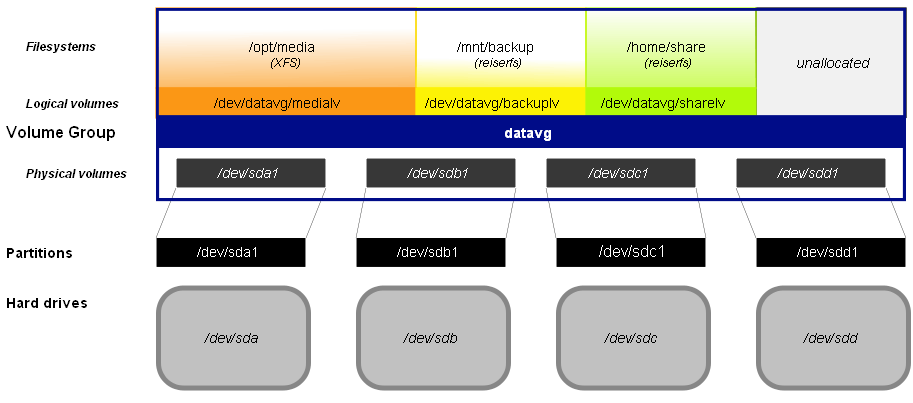
Now a days, when one installs Linux on ones machine, in more cases than one, there is a trend to create a logical volume and create the file system on this volume rather than creating the file system in individual partitions. I have myself created logical volumes on one of my machines running Linux.

Logical volumes have their own advantages in that one can grow or shrink a volume without any loss of data. And that makes it much more flexible than creating file systems directly in partitions. Another advantage is that one can bundle multiple hard disks together to create a single logical volume such that the operating system sees only one volume even as the data resides across multiple physical hard disks. In a previous post titled "Resizing Logical Volumes", I had briefly put down my experiences in create logical volumes in Fedora Linux.

Now Bryce Harrington and Kees Cook have come together to write this very informative article titled 'Managing Disk Space with LVM' which clearly explains the ins and outs of creating, modifying and deleting logical volumes in Linux which makes an interesting read.

Usually, logical volumes are more desirable where there is a constant flux in the amount of data in storage devices such as a machine running as a file server or a database server and so on. But even home users could benefit from creating logical volumes if they are in the habit of saving lots of data on their hard disk like games, movie clips,songs... and see their disk space shrinking at a fast pace.And if the hard disk fills up, the procedure is as simple as attaching a second hard disk and then extending the logical volume on the first hard disk to include the new one. But if you go the LVM way for your desktop, just make sure that the /boot directory resides in a physical partition of its own instead of the logical volume as boot loaders like GRUB and LILO don't support LVM yet.

Interview : Linus Torvalds says he has never used Debian yet

July 20, 2007 0 comments
Alright, many of you would find this title a bit controversial. But that is exactly what Linus Torvalds the father of Linux said when asked the simple question of which Linux distribution is his favourite one.

Linus Torvalds was interviewed by oneopensource.it where he went on to express his thoughts on a variety of topics including GPLv3, whether Linux infringes Microsoft patents, about Microsoft - Novell agreement, the future of Linux kernel and so on.

The questions posed are quite thoughtful and Linus Torvalds answers are equally interesting.

On questioned as to "which is your favourite distribution, and which one do you consider more secure?", this is what he had to say ... (and I quote)

I don’t really tend to care much, I’ve changed distributions over the years, and to me the most important thing tends to be that they are easy to install and upgrade, and allow me to do the only part I really care about - the kernel.

So the only major distribution I’ve never used has actually been Debian, exactly because that has traditionally been harder to install. Which sounds kind of strange, since Debian is also considered to be the “hard-core technical” distribution, but that’s literally exactly what I personally do not want in a distro. I’ll take the nice ones with simple installers etc, because to me, that’s the whole and only point of using a distribution in the first place.

So I’ve used SuSE, Red Hat, Ubuntu, YDL (I ran my main setup on PowerPC-based machines for a while, and YDL - Yellow Dog Linux - ended up the easiest choice). Right now, most of my machines seem to have Fedora 7 on them, but that’s only a statement of fact, not meant to be that I think it’s necessarily “better” than the other distros.

GNUCash 2.0.0 - My favorite personal accounting software now available on Windows

3 comments
I have used a number of personal accounting software some of them non-free ones. But none compares with GNUCash when you compare them for ease of use, unbeatable price and extensive features all combined. GNUCash beats all its competition hands down. I have always wondered why most Linux distributions targeted at the desktop do not bundle GNUCash by default. Of course it is simple enough to install it separately using Synaptic or equivalent package management tool. But then if any package is to be included in a Linux distribution targeted at the lay person, I would say it should be a personal accounting software as most people will find it a useful tool to manage their finances. And at present GNUCash has left its nearest competitor far behind.

The good news is that now the Windows users can also feel happy because the stable version of GNUCash ver 2.2.0 has been released for Windows too apart for other OSes such as Linux, BSDs, Solaris and MacOSX.

A couple of months back, I had used GNUCash ver 2.2.0 in Windows when it was still in the testing stage. And even at that time, this marvelous piece of software hadn't crashed even a single time. And I suppose in the stable version it has become even more robust.


Some of the features of GNUCash 2.2.0 are as follows :
  • Supports Double Entry Accounting - this means it can be used to manage the accounts of even small to medium businesses.
  • Excellent support for generation of various reports of your financial status.
  • You can view your expenses and incomes as pie charts.
  • Supports currencies of most countries
  • Support for Online banking
  • Cheque printing
  • Automatically save the data file
  • Statement reconciliation
  • Choose from 21 different languages to display menus and dialog boxes and much more.
Here is a tip to efficiently use GNUCash. You can save the data file (which contains the financial data) in a removable media such as a USB Pen drive. And then install GNUCash in all the OSes that you have installed on your machine. So when ever you want to enter a record of the day's expenses, just plug in the USB pen drive and open GNUCash in which ever OS you seems to be using at that time. GNUCash will open the last used data file automatically.

If you are a Windows user (I wonder why ;-)), you can download the GNUCash 2.2.0 binary and give it a try. I assure you, it won't be a disappointing experience. And if you wonder why you are better off using a personal accounting software, then let me tell you, it is the best thing you would be doing to yourself because it gives you a snapshot of your net worth after the checks and balances. It shows you your spending patterns over a period of days, weeks, months and years. And using a personal accounting software you will be able to analyze your income and expenses and help you plug unnecessary expenses. On a personal note, after starting to use GNUCash, I came to realize that I was spending a good amount eating out and I made a conscious effort to curtail my gourmet craves.

Koolu - a Linux thin client which goes easy on the environment

July 18, 2007 1 comments
A thin client is a client computer in a client-server setup which depends on the central server for processing activities. Its primary job is to convey input and output between the user and the remote server. The advantages of using thin clients in a small to medium network are many such as saving on space, lower power consumption, better utilization of computing power and so on.

Koolu is an Australian startup which offers Linux based thin clients and appliances. Koolu is the brain child of Jon Maddog Hall who is one of the leading Linux and Open Source proponent.

Koolu provides thin clients in the price range of $199. And its net appliance is priced at $299. Both the thin clients and the net appliance enjoy a very small footprint to the extent that they could be held in the palm of ones hand. The net appliance is more or less a standalone PC which comes with a modest 500 MB RAM, a 40 GB harddisk and Ubuntu pre-installed. Where as the thin client has just 256 MB RAM and no hard disk. Other than that, both the thin client and the net appliance have the same hardware specifications.

Hardware specifications of the devices are as follows :
  • Processor: AMD Geode LX 800 (500MHz@0.9W)
  • USB 2.0 ports - 4 Nos
  • Dimensions - 13.5 (Width) x 13.5 (Depth) x 3 (Height) Cm
  • Memory - 256 MB for thin client and 512 MB for web appliance. Can be upgraded to 1 GB
  • AMD LX 800 Integrated Graphic
  • Sound - Realtek ALC203_LF AC’97 (2-Channel Support)
  • Ethernet - Realtek RTL8100C-LF 10/100 MB LAN
  • Fan Less Solution / Dust Resist
  • Is energy efficient and uses less than 10 watts.
The 4 USB ports, the LEDs and Sound related ports are situated in the front. And the RJ-45 jack, VGA, Line Out, 12V DC IN and Kensigton lock hole are situated in the back.

Thin clients are nothing new and there are a couple of projects around such as Pxes and LTSP.org which help you to convert your old machine to work as a thin client. But the advantage of Koolu is that all the configuration has already been done and all that the end user has to do is plug in the machine and start using it. More over, the Koolu team claims that since their machines consume relatively less power, they are more environmentally friendly and you can recover the cost of the machine in 2 years by saving in energy bills.

You can buy Koolu online directly from the Koolu official site.

System logging explained in Linux

July 17, 2007 3 comments
If you are serious about learning Linux, then you might want to familiarize yourself with log files. Log files are very good for helping you deduce what is going wrong with a system.

Most system critical programs (which includes the Linux kernel) generate log files. And they are all stored in /var/log directory or one of its sub-directories.

Linux Help blog now has a new feature - Polls

July 16, 2007 0 comments
Any blog hosted on blogger.com has its own share of advantages and disadvantages. But over the 4 years since this blog has been online, I can very well say that the advantages far outweigh the disadvantages.

At times I have felt a dire need for an easy way to clip posts on the front page by providing a "Read More" link. Yes there is a third party hack for this feature which is cleverly implemented using a combination of CSS and script. But nothing beats having a simple inbuilt solution as seen in Wordpress or Drupal CMS. That is not all, there are lots of other features that I feel could be incorporated in Blogger.com.

Having said that, Blogger development team is working hard to improve and better integrate many useful features. And Polls are its latest offering. If you check the right hand side of this blog, you will find a poll which you can participate in. Do try it out. You can also view the results of the poll which is implemented using Ajax so your page will not be reloaded.

And every two weeks, this blog will have a new poll which will try to mine the computing trends of different people. So keep an eye on the polls when you visit this blog and do take part in it. The very first poll asks you which is your favorite text editor.

OpenMoko Neo1973 - an open source Linux based iPhone killer in the making ?

July 10, 2007 6 comments
OpenMoko is a GNU/Linux based open software development platform. What this means for the lay person is that using OpenMoko software development kit, phone manufacturers will be able to bring out mobile phones which have more or less the same features of the now widely known iPhone from Apple and much more - all this under an Open license powered by GNU. This also means that for the first time there is potential for you to be completely free from being tied up with one mobile carrier or even a single phone manufacturer (read Apple) for want of anything better.

Fig: Openmoko touch screen phone

Recently OpenMoko a project set up by "First International Computings" (FIC) released a developer version of a mobile device named Neo 1973 which is a completely open, Linux-based, GPS-equipped, quad-band GSM/GPRS phone and which has a touch screen equivalent to that in Apple iPhone but which additionally comes with a stylus. The Neo1973 is priced in the $300 to $450 range. Below I have included the rough specifications of both the Openmoko's Neo1973 and Apple's iPhone for comparison.

Openmoko Neo1973 cell phone specifications
  • 2.8" VGA TFT color display (640x480 resolution)
  • Touchscreen, usable with stylus or fingers
  • 266MHz Samsung System on a Chip (SOC) (ARM9 processor)
  • 128 MB RAM
  • 64 MB Flash memory
  • USB 1.1, switchable between Client and Host (un-powered)
  • Integrated AGPS
  • 2.5G GSM – quad band, voice, CSD, GPRS
  • Bluetooth 2.0
  • Micro SD slot
  • High Quality audio codec
  • 1200MA Lion cell battery which the openmoko team guarantees to provide a minimum of 4 hours of power when used continuously before a recharge. The battery can be easily replaced by the users.
Additional freebies thrown in with Neo1973 phone include...
  • 512 MB Sandisk SD card.
  • A good quality set of ear phones.
  • A USB connectivity cable.
  • Stylus
  • A very functional pouch to hold the phone and
  • A Lanyard to safely tether your phone.
Apple iPhone specifications are as follows :
  • Powered by ARM11 processor
  • 128 MB RAM
  • 4 or 8 GB flash memory
  • Screen resolution of 320x480
  • Bluetooth and WiFi enabled
  • Integrated 2 Megapixel camera and
  • an accelerometer
When compared to an iPhone, the Neo1973 from OpenMoko is a bit behind as it doesn't come with a camera, no accelerometer (Which is promised in the next version of the phone), no multi-touch, does not provide WiFi support and does not have gigabytes of storage space.

But in many respects, people buying this phone will have a decisive advantage that the phone runs on GNU/Linux which means that third parties can easily develop applications using openmoko software development platform and thus provide an enhanced end user experience.

Additionally Apple's iPhone has a number of drawbacks such as ...
  • The battery is soldered to the circuit. So it is not possible for the iPhone owners to replace the battery by themselves.
  • iPhone software development kit is proprietary to a fault so much that third parties will not be able to develop software to run on an iPhone.
  • There is no USB connectivity.
  • There is no GPS.
  • And you can't switch carriers.
Here is another interesting thing... you can charge the Neo1973 phone by merely connecting it to the USB port of your PC and you can browse the internet using the phone as a modem more specifically using its GPRS data connection. And it has GSM multiplexing capabilities provided via a custom patch to the Linux kernel (2.6.18) which means you can browse the net and at the same time receive a call too.